GrabGPU vs AIMultiple: Stop Reading GPU Prices You Can't Rent
· comparison

The price was never the hard part
You found a cheap H100 rate. You opened the provider’s console and got the usual empty region, a greyed-out button, or a waitlist.
Most GPU price pages fail the same way. They tell you what a card should cost. They don’t tell you whether you can rent one today.
AIMultiple’s Cloud GPU Pricing, Performance & Provider Comparison is one of the best-known research pages on this topic, and it says so itself: “a listed price does not guarantee that an instance can be started.” It also warns that “published listings can include unavailable or unknown stock states.”
That’s honest. It still leaves you with the job you came to get done.
What AIMultiple does well
AIMultiple is a research article with a calculator built in. Its header reads “1,245 offerings across 28 providers.” It has on-demand, spot and reserved tables, plus its own throughput benchmarks: “we ran identical text and image generation workloads on AMD MI300X 192GB at DigitalOcean and Runpod.”
If you’re writing a procurement memo and want benchmark context, it’s a solid read. The granular data sits behind a paywall: “Want the granular data behind it? Join Premium.”
The catch for anyone trying to launch a job right now: the page gives two different dates. The calculator says “Updated on November 15, 2026” and the footer says “Last updated: November 11, 2026.” In a market where capacity disappears overnight, a gap like that matters.
What GrabGPU does differently: availability first
GrabGPU is built for the ML engineer who already has a price and wants one thing answered: can I actually rent this card?
Every price on GrabGPU comes with the stock level the provider reported when we collected it. The /in-stock/ page ranks only capacity a provider reported as available, cheapest first. It hides cards that aren’t there.
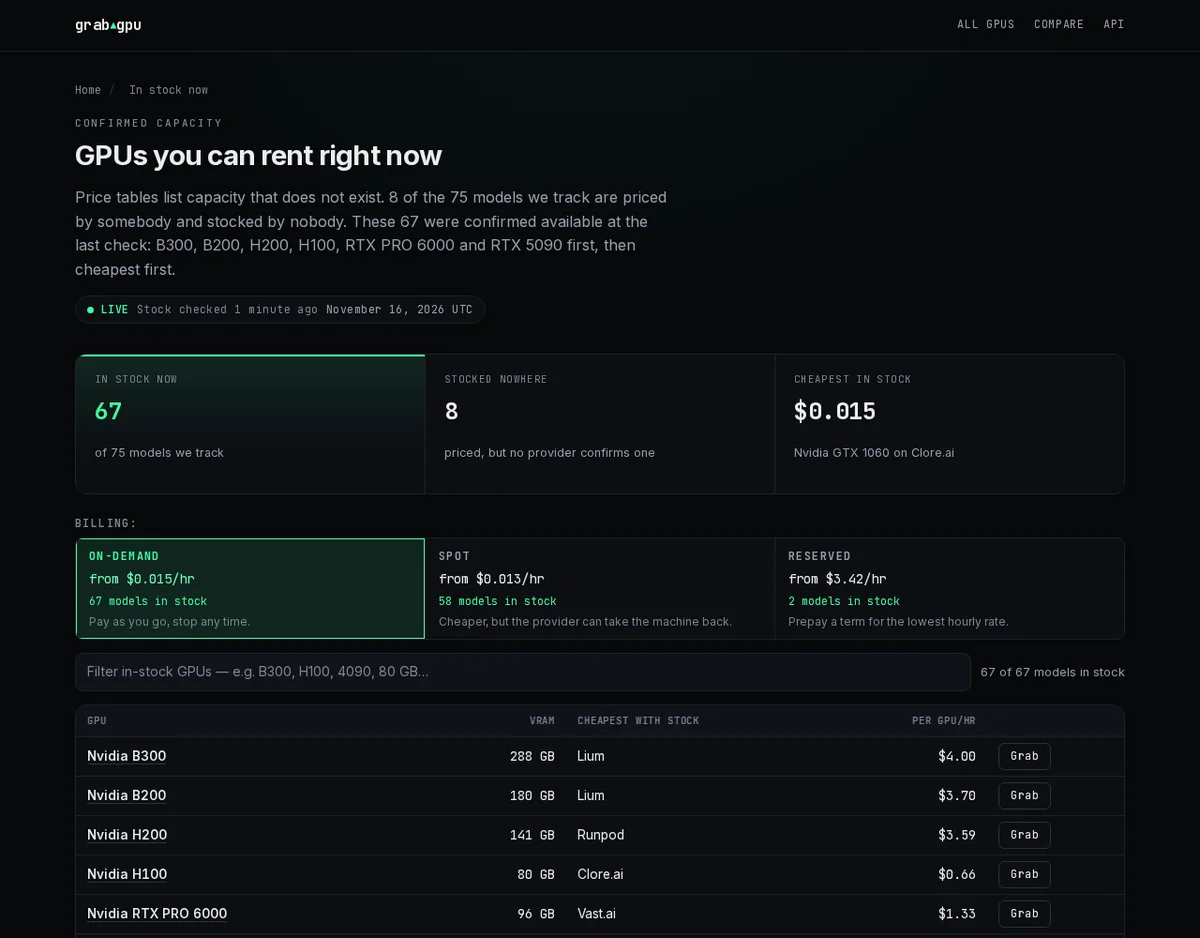
When we checked grabgpu.com today, it tracked 75 GPU models, 67 of them rentable right now. Its freshness stamp read “1 minute ago.”
Spot prices never headline a GrabGPU page. A preemptible bid isn’t the same product as an on-demand hour, and leading with it makes every card look cheaper than anyone can actually rent it. On GrabGPU, spot, on-demand and reserved prices are shown separately.
Prices that hold for more than one day
A single cheap listing that’s gone by lunch doesn’t help you plan. GrabGPU keeps its own daily snapshots, so you can see the price that actually held:
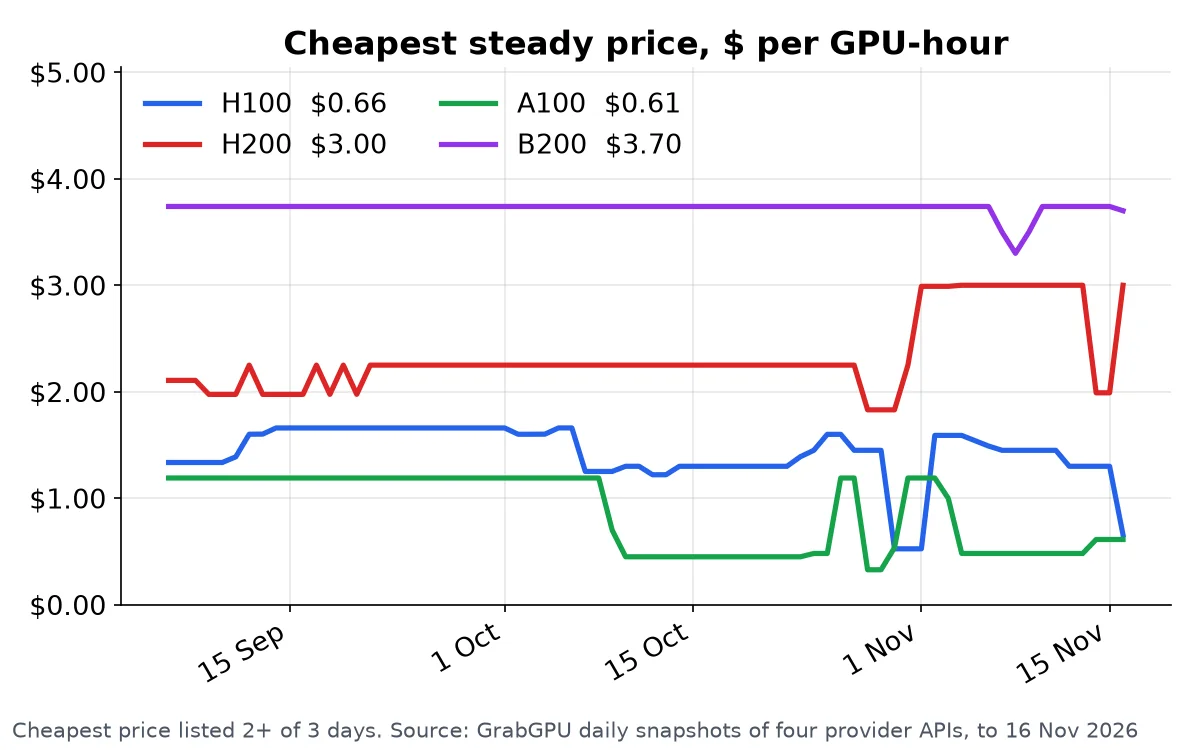
The data comes straight from public provider sources such as Shadeform, Vast.ai, RunPod and Lium, never from another comparison site. According to the homepage, the typical model is 28% cheaper at its cheapest provider than at the median one. Every time you rent at the median, you pay that gap.
Head to head
- Main question it answers. AIMultiple: what GPUs cost, and how they benchmark. GrabGPU: what you can rent right now, and the cheapest place to get it.
- Stock. AIMultiple: listings “can include unavailable or unknown stock states.” GrabGPU: every price carries the stock the provider reported, and /in-stock/ shows only reported-available capacity.
- Freshness. AIMultiple: “Updated on November 15, 2026” in the calculator. GrabGPU: the stamp read “1 minute ago” when we checked.
- Raw data. AIMultiple: granular data is offered through “Premium.” GrabGPU: a free JSON API, plus Markdown and llms.txt versions of the data.
- Benchmarks. AIMultiple runs its own throughput tests. GrabGPU sticks to price and availability.
- Format. AIMultiple: a research article with tables. GrabGPU: a page for every GPU model, provider, comparison pair and country.
Which one is for you
If you want benchmarks for a slide deck, read AIMultiple.
If a training run is waiting and you need a card you can actually get, the extra hours spent hunting through consoles cost you money and momentum. Use GrabGPU. Find the card, check that a provider reports it in stock, and click through to rent it.
One honest note: some of GrabGPU’s provider links are referral links that may earn a commission. Always confirm the price and stock on the provider’s own site before you pay.
Rent the card before someone else does
Scarce capacity goes to whoever finds it first. Stop refreshing consoles.