GrabGPU vs FastGPU: Stop Shopping for GPUs That Aren't There
· comparison

GrabGPU vs FastGPU: Stop Shopping for GPUs That Aren’t There
You know how this goes. A comparison table shows you a great H100 price. You open the provider, pick the region, click deploy, and get told there is no capacity. You go back to the table and try the next row. Then the next.
The price was real. The machine behind it wasn’t.
That is the problem GrabGPU was built for. Here is how it compares with FastGPU, one of the best-known live GPU price comparison sites, and which one suits you.
What FastGPU does well
Credit where it’s due. FastGPU covers a lot of ground. Its homepage lists “38 providers” and “65 GPUs”, with marketplaces, neoclouds and hyperscalers in one feed. You can describe your workload and get the live market ranked for that job, and it stamps each row with when it was fetched. It also arranges cluster quotes, where, in its words, “The supplier pays us 3% on a closed deal; you pay nothing.”
If you want hyperscaler coverage, a workload matcher or a broker for a large cluster, FastGPU is built for that.
Where the usual table lets you down
Stock is the hard part. FastGPU shows stock labels such as In stock, Low stock and Sold out on some rows, but not every offer carries one. On the live table we checked, an H100 PCIe row on RunPod had no stock label at all. A row with no label could be a machine you can rent, or it could be one more dead end.
When you need a card before tonight’s training run, an unlabelled price leaves you guessing.
What GrabGPU does differently: stock first, then price
GrabGPU starts from one question: can you actually rent this card right now?
Every price on GrabGPU carries the stock the provider reported when we collected it. The in-stock page goes a step further and lists only capacity a provider confirmed was available, cheapest first. The page says it plainly: “Price tables list capacity that does not exist.”
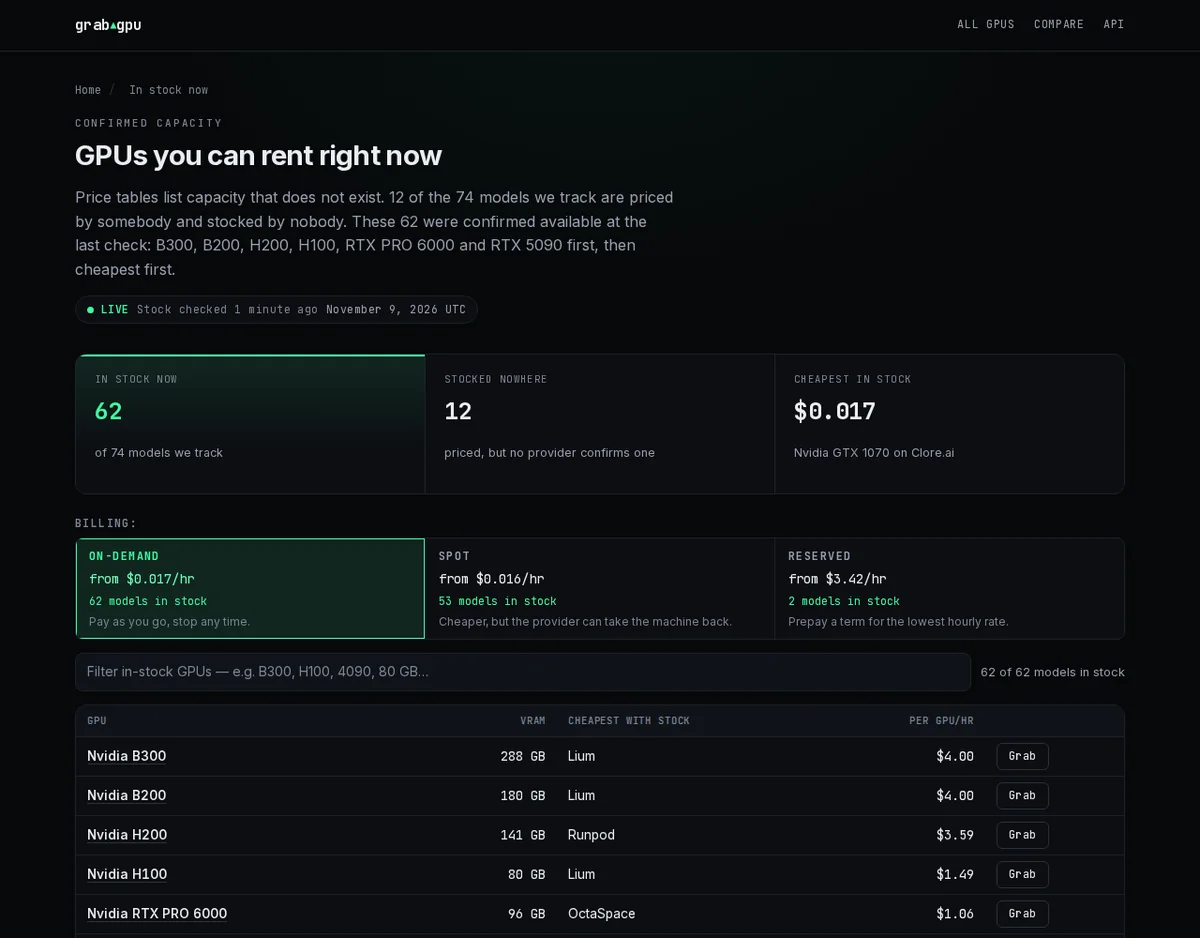
The numbers back this up. At the last check, 62 of the 74 models GrabGPU tracks were confirmed available, and 12 were “priced by somebody and stocked by nobody”. Those 12 still show up as prices on the wider market. On GrabGPU’s in-stock list you never see them, so you never click them.
Prices you can actually pay
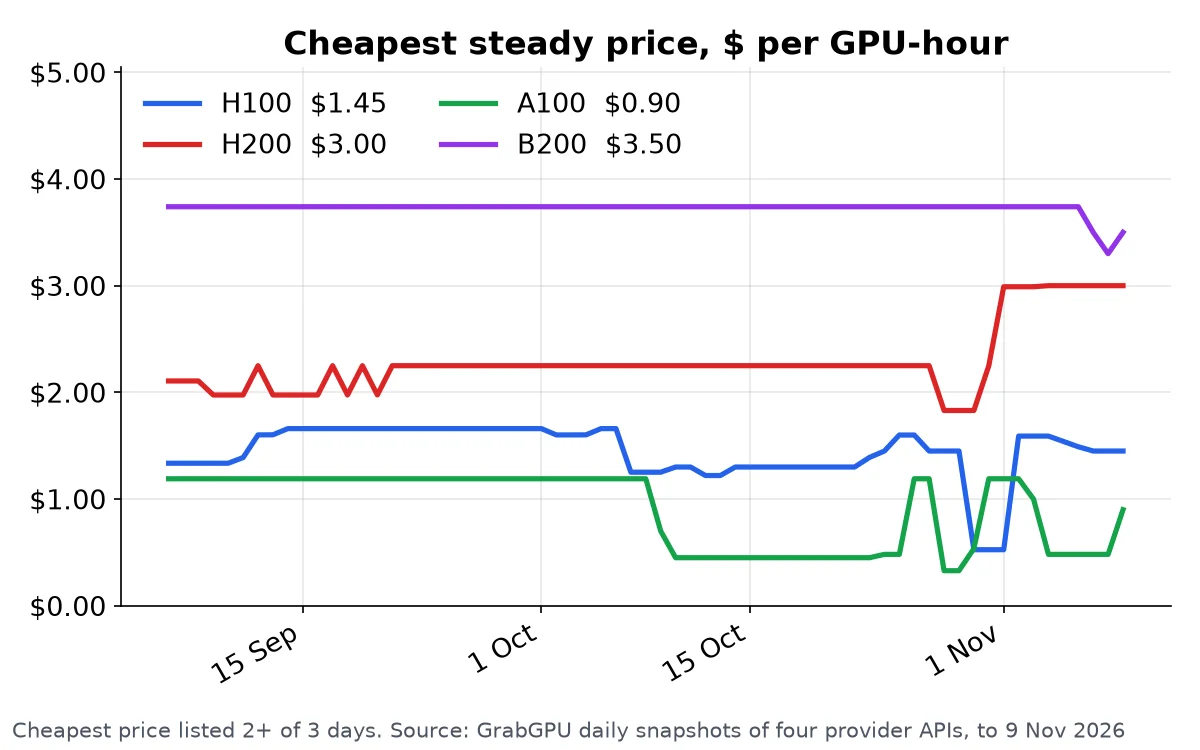
GrabGPU never puts spot prices in the headline. A preemptible bid is not the same thing as an on-demand hour, and quoting it as one makes every card look cheaper than anyone can rent it for. When you filter, on-demand, spot and reserved are kept apart. The homepage shows each tier on its own.
The spread is worth knowing too. According to the GrabGPU homepage, “The typical GPU model is 27% cheaper at its cheapest provider than at the median one.” If you rent from whoever you used last time, you could be paying that gap every hour.
Raw sources, never another comparison site
GrabGPU pulls from public provider and marketplace sources directly: Shadeform, Vast.ai, RunPod, Lium, Clore.ai, OctaSpace, SimplePod, CloudRift and more. It never copies from another comparison site. We keep improving how we read them, too. Our latest fix means GrabGPU now reads Vast’s RTX PRO 6000 S and WS boards. Before that fix, no Vast offers for that card came through at all.
Side by side
- Main question it answers. FastGPU: what is the cheapest GPU across the whole market for my job? GrabGPU: what can I rent right now, and what is the cheapest of that?
- Coverage. FastGPU: 38 providers, 65 GPUs, hyperscalers included. GrabGPU: 74 models tracked, drawn from marketplaces and GPU clouds.
- Stock labels. FastGPU: on some rows, not all. GrabGPU: every price carries reported stock, and the in-stock page shows only confirmed capacity.
- Spot pricing. GrabGPU never headlines it. Spot, on-demand and reserved are filtered separately.
- Data access. FastGPU: a public API and a free dataset. GrabGPU: a free price API in JSON, Markdown and plain text, plus an
llms.txtso AI assistants can read the full price table. - Cluster brokering. FastGPU: yes, supplier-paid. GrabGPU: no. It sends you straight to the provider with a Grab button.
Which one should you pick?
Pick FastGPU if you are sourcing a large cluster, want hyperscaler prices in the mix, or want a broker to handle the quote.
Pick GrabGPU if you are an ML engineer who has already seen the price and now needs to know one thing: is there a machine behind it? You open the in-stock page, pick the cheapest card that fits, hit Grab, and you’re on the provider’s deploy page. No more clicking through rows that are sold out.
Cheap capacity moves fast. The in-stock page warns that it “turns over in hours.” The card you’re after is either on the list now or gone by the time you get back to it.
Grab it while it’s there
Stop paying for a price you can’t rent. See what’s in stock right now on GrabGPU →
Some GrabGPU links are referral links, and GrabGPU may earn a commission. Prices change often, so confirm on the provider’s site before you rent.