GrabGPU vs GPU Per Hour: Stop Chasing GPU Prices You Can't Actually Rent
· comparison

The price was great. The card wasn’t there.
You know how it goes. You find a cheap H100 rate on a comparison site, open the provider’s page, pick a region, and get “no capacity.” You try the next row and the next region. A cheap price is useless if you can’t actually rent the card.
The usual fix is a price aggregator. GPU Per Hour is one of the better-known ones. Its Product Hunt tagline reads “Compare GPU cloud prices across 30+ providers in real-time”. This post compares it with GrabGPU for one specific reader: the ML engineer who already has a price and only wants to know where the card can be rented right now.
What GPU Per Hour offers
To be fair, GPU Per Hour covers a lot. Its Product Hunt page names RunPod, Vast.ai, Lambda Labs, TensorDock and CoreWeave among its providers. In the same post the maker reports 1,800+ GPU configurations from 27+ cloud providers, including AWS. Its G2 listing says it covers both on-demand and spot instances and tracks availability alongside price. It also lets you filter by GPU model, region, provider and deployment type. BetaList adds VRAM and GPU-count filters, side-by-side comparison and click-through deploy links.
If you want the widest catalog, hyperscalers included, that breadth is real.
One thing to know: the listings don’t agree on how fresh the data is. The Product Hunt description says “Updated daily with live pricing data” next to a “real-time” tagline, and BetaList says prices refresh once an hour. On that same Product Hunt page, a commenter asked whether the prices reflect spot volatility or stable on-demand rates, and the page shows no answer.
What GrabGPU does differently: stock first, price second
GrabGPU is built around the question that decides whether you rent a card today: is it actually available?
- Every price comes with the stock the provider reported. Each row shows what the provider reported at the last check.
/in-stock/ranks only confirmed capacity. If a provider didn’t report the card available, it isn’t on that page. The site says the in-stock page “ranks only capacity that was confirmed.”- Spot prices never headline a page. You can reclaim nothing from a spot bid that gets taken away. On-demand, spot and reserved are shown separately, so a cheap spot bid never sets the on-demand number you’re quoted.
- Primary sources only. The data comes from public provider sources such as Shadeform, Vast.ai, RunPod, Lium, Clore.ai, CloudRift, Verda, Nebius and others, never from another comparison site. Meshive and Compshare were just added as sources.
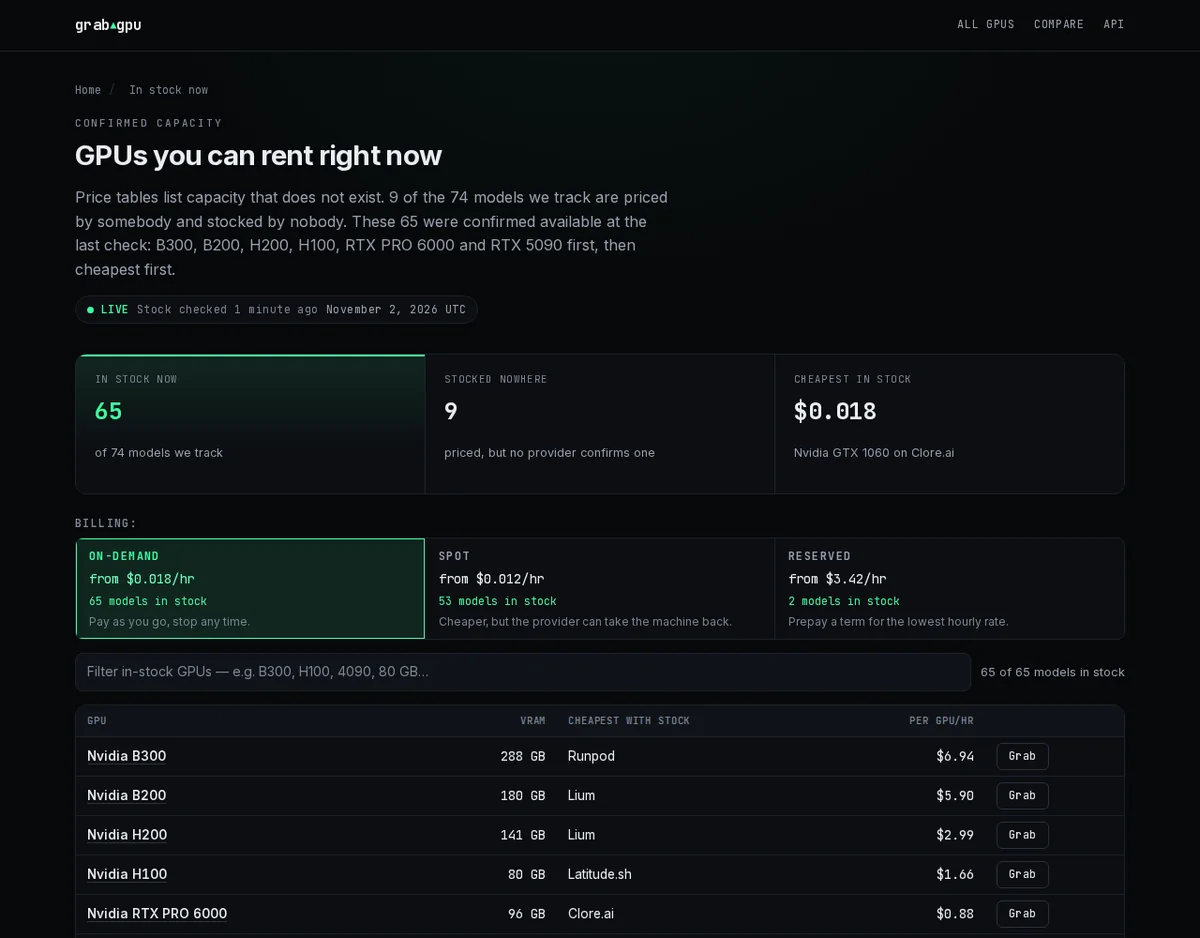
Here is what that looks like today. GrabGPU’s homepage reports “65 of 74 GPU models are rentable right now,” and splits the market into on-demand from $0.018/hr, spot from $0.012/hr and reserved from $3.42/hr, each with its own stock count.
Prices that hold for more than a day
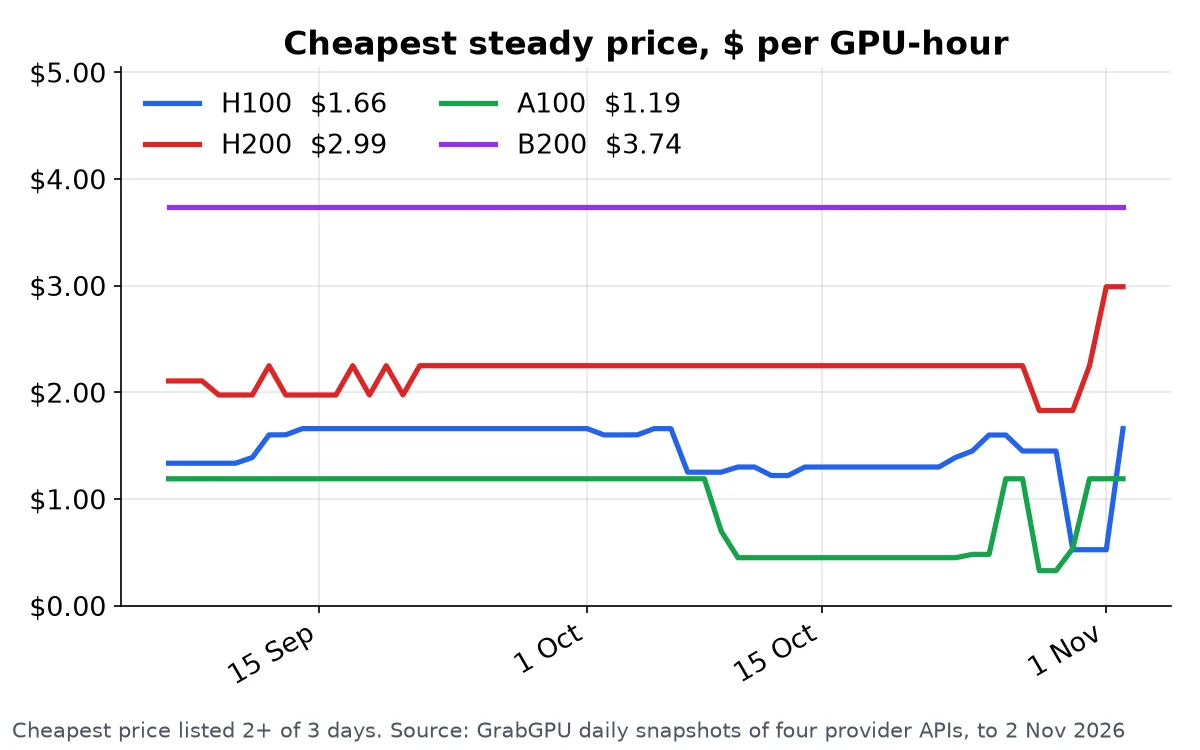
A one-off price drop that is gone by the time you try to rent shouldn’t set your budget. GrabGPU keeps its own daily snapshots, so you can see the cheapest steady price for each card over time, not just today’s best case.
GrabGPU also reports that the typical GPU is 27% cheaper at its cheapest provider than at the median provider. If you rent from the first cloud you think of, you’re likely paying that gap.
Head to head
- Main question it answers. GPU Per Hour: where is this GPU cheapest, across a wide catalog (Product Hunt). GrabGPU: where can I rent this GPU right now, and at what price.
- Stock. GPU Per Hour tracks stock status (BetaList). GrabGPU attaches the provider-reported stock to every price and has a page,
/in-stock/, that lists only confirmed capacity. - Spot vs on-demand. GPU Per Hour covers both (G2). GrabGPU lists them separately and never leads with a spot price.
- Freshness. GPU Per Hour’s listings say daily, real-time and hourly in different places. GrabGPU says its data refreshes hourly and shows when it last checked.
- Breadth. GPU Per Hour lists hyperscalers like AWS. GrabGPU focuses on GPU clouds and marketplaces, where cheap capacity actually turns up.
- Data access. GrabGPU’s data is free: documented JSON endpoints, a Markdown table and an
llms.txt. Whole-dataset files allow 20 calls a day without a key, and a free key raises the limit.
Who should pick which
If you’re doing broad market research that includes AWS-style pricing, GPU Per Hour’s wide catalog is a reasonable place to start.
If you have a job queued, a deadline coming and no patience left for “no capacity” screens, use GrabGPU. Open the in-stock page, take the cheapest card a provider actually reported available, and start your run.
Capacity on the cards everyone wants doesn’t sit around. Each time you check a price you can’t rent, someone else takes the card.
See what’s in stock right now on GrabGPU →
Some provider links on GrabGPU are referral links, so GrabGPU may earn a commission at no extra cost to you. Confirm the final price on the provider’s site before you rent.