GrabGPU vs GPU Tracker: Stop Comparing Prices for GPUs You Can't Rent
· comparison

The cheapest price is useless if it’s sold out
You know how this goes. You open a price comparison, find a great H100 rate, click through, and the provider has nothing left. Or the low price turns out to be a spot bid that can be taken back halfway through a training run. So you go back to the list and try the next one.
Price lists are easy to find now. Knowing whether you can actually grab the card is the hard part. That gap is the whole reason GrabGPU exists.
This post puts GrabGPU next to GPU Tracker, one of the most complete live GPU price comparison sites around.
What GPU Tracker does well
GPU Tracker is big. Its pricing page describes a “complete breakdown across 54 providers and 75 GPU models”, and its homepage shows 5,213 instances. It also has workload filters, a risk column, token-cost estimates and calculators. If you want the widest possible list of listings, including hyperscalers and egress fees, it’s a strong tool.
What we couldn’t find on its homepage or its pricing breakdown is a stock status on each offer. Neither page says whether a listing can be rented right now. It tags some listings “Spot”, but the homepage doesn’t say that the untagged ones are on-demand.
What GrabGPU does differently: availability first
On GrabGPU, every price comes with the stock the provider reported when we last checked. The in-stock page only ranks capacity a provider has confirmed, cheapest first.
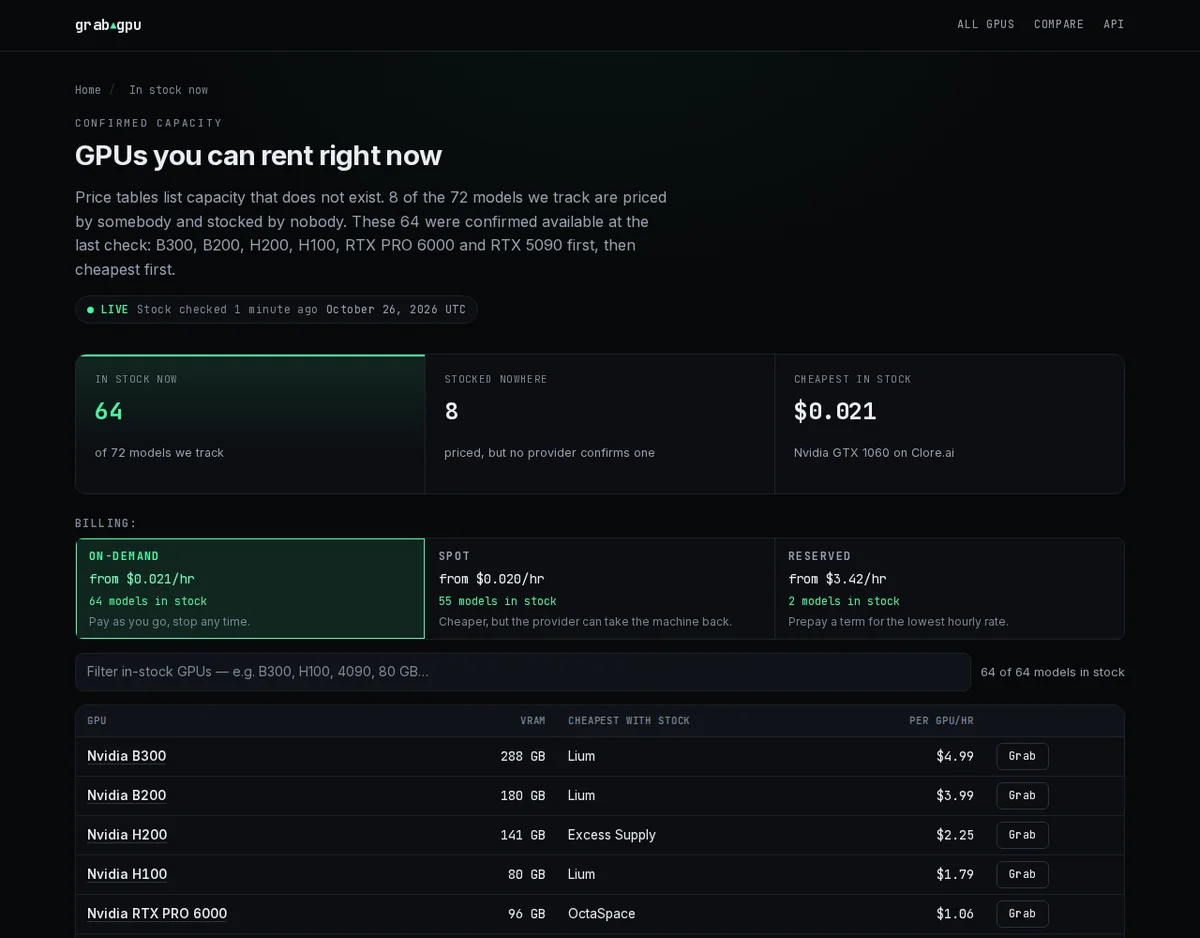
Right now, GrabGPU’s homepage says “64 of 72 GPU models are rentable right now.” That one line tells you more about your evening than another long price table.
On-demand, spot and reserved are kept apart
We just shipped a full-width Billing switch above the prices on the GPU list, the GPU pages and the in-stock page. Each billing type shows its own lowest price, its own stock and one plain line about what it means. Reserved has a filter for the prepaid term.
This matters more than it sounds. We now count stock separately for each billing type. If a provider has spot capacity but on-demand is sold out, it no longer counts as in stock for on-demand. “Cheapest in stock” uses on-demand stock only, so a cheap spot listing can’t make an on-demand price look rentable when it isn’t.
Cleaner data, fewer surprises
Our latest commits are all about trust:
- Mixed-card nodes are skipped. A node with two different card models used to share one price and one memory total, so it could show up as the wrong card. Now those nodes are left out.
- Duplicates are counted once. One offer listed under two instance types no longer doubles a provider’s config count.
- One card, one row. Memory sizes reported slightly differently for the same board now merge into one row in the price-by-memory table.
- Per-second billing is labeled. Vast and RunPod prices carry a “per sec” badge.
Price history and a free API
Every GPU page has a price trend, built from our own snapshots of the providers.
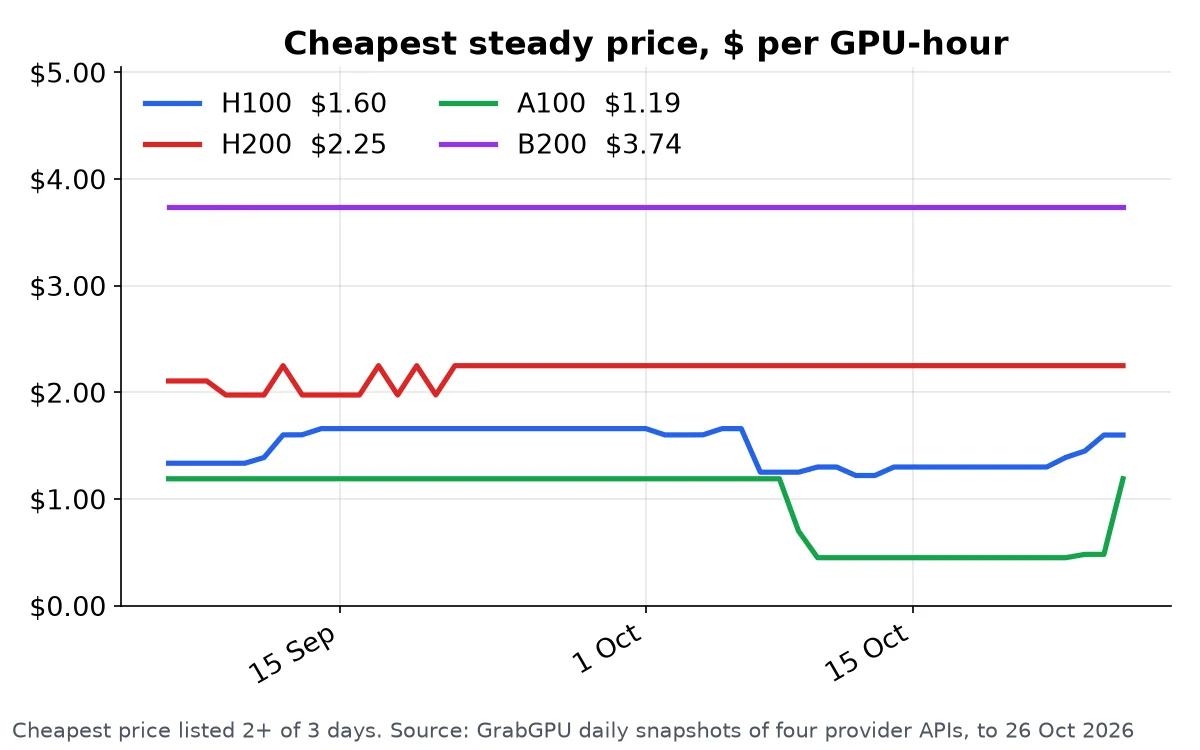
On GPU Tracker, price-drop alerts and per-model price history are part of the Pro plan, listed at $49/mo. On GrabGPU, browsing is free and so is the JSON API: a free key lifts the daily limit, and every offer includes a link to rent it.
GrabGPU vs GPU Tracker at a glance
- Main question it answers: GrabGPU tells you can I rent this right now, and for how much? GPU Tracker tells you what does this cost across the whole market?
- Stock on each offer: GrabGPU shows the stock each provider reported. We found no stock indicator on GPU Tracker’s homepage.
- Billing types: GrabGPU has a dedicated switch for on-demand, spot and reserved, with stock counted per type. GPU Tracker tags some listings “Spot”.
- Breadth: GPU Tracker covers 54 providers, hyperscalers and egress fees included. GrabGPU focuses on the providers whose prices and stock it can read directly.
- Price history: GrabGPU has a trend chart on GPU pages for free. On GPU Tracker it’s in the Pro plan.
- API: GrabGPU’s API is free with no key. GPU Tracker links to a Pro API from its pricing page.
Which one should you use?
If you’re doing procurement research across every cloud, hyperscalers included, GPU Tracker’s breadth is useful.
If you’re an ML engineer who already knows roughly what a card costs and needs one now, start with GrabGPU. Every minute you spend clicking through to sold-out providers is a minute someone else uses to grab the capacity you wanted. Prices and stock move all the time, so always confirm on the provider’s site before you rent.
Find a GPU you can actually rent
Stop chasing prices for cards that aren’t there. Open the in-stock list, choose your billing type, and rent while the stock lasts.
See what’s in stock right now on GrabGPU →
Some provider links on GrabGPU are referral links, and GrabGPU may earn a commission from them.