GrabGPU vs ComputePrices: Stop Shopping for GPUs You Can't Rent
· comparison
The cheapest price is useless if you can’t rent the card
You know how it goes. You find a cheap H100 on a comparison table, open the provider’s console, and there’s nothing to launch. So you try the next row, then the one after that. The price was real. The card just wasn’t there.
That’s the gap GrabGPU was built for. Price tables are a solved problem, and ComputePrices is one of the best-known ones. What most of them treat as a footnote is the question you actually care about: can I rent this card right now?
What ComputePrices does well
ComputePrices is broad, and that’s worth saying up front. Its homepage says it compares “cloud GPU rental prices and LLM inference API costs across every major provider” and tracks 111 providers, with prices normalized per GPU-hour and per million tokens. If you need token prices next to GPU prices, or you want the widest possible list of clouds, it’s a strong pick.
It doesn’t ignore stock entirely. On its H100 page, some rows carry an “out of stock” label next to the provider name. But the table is organised around price, provider, configuration, an update date and a source link. Availability is a tag on a row, not how the page is sorted.
What GrabGPU does differently: availability first
GrabGPU flips that order. Every price comes with the stock the provider reported at the last check. Then a whole page, /in-stock/, ranks only the capacity that was confirmed available, cheapest first.
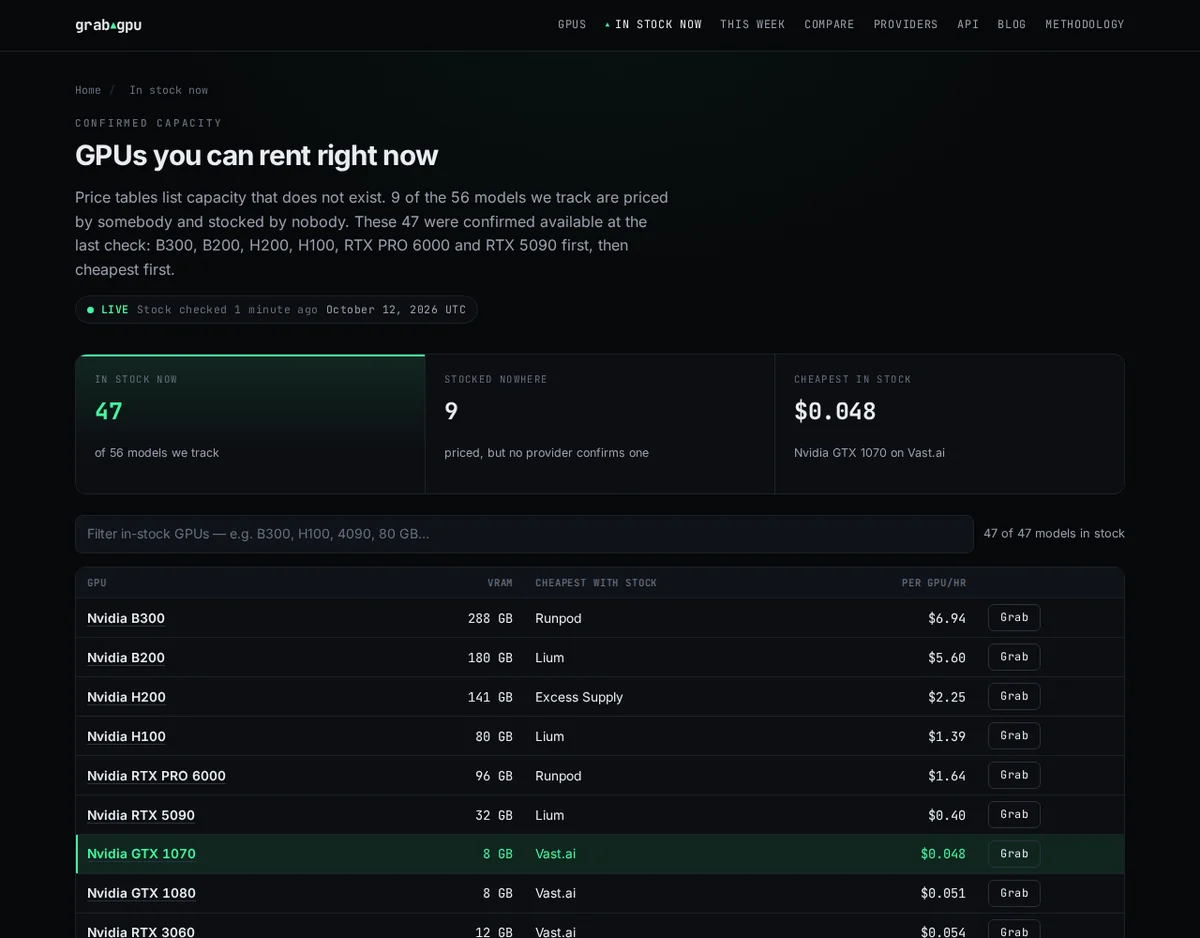
The numbers show why this matters. On the in-stock page, “9 of the 56 models we track are priced by somebody and stocked by nobody.” Those 9 cards still show up as prices on the wider web. On GrabGPU they never reach the list you shop from, so you don’t lose time clicking through to them.
The page also says it plainly: cheap capacity “turns over in hours.” A price alone doesn’t tell you whether you’ve already missed it. A stock flag next to that price does.
Prices that still matter
Availability comes first, but price is still part of the pick. The GrabGPU homepage says “The typical GPU model is 21% cheaper at its cheapest provider than at the median one.” Each model page lists every provider’s offer next to its stock, and the price trend shows where the floor has moved.
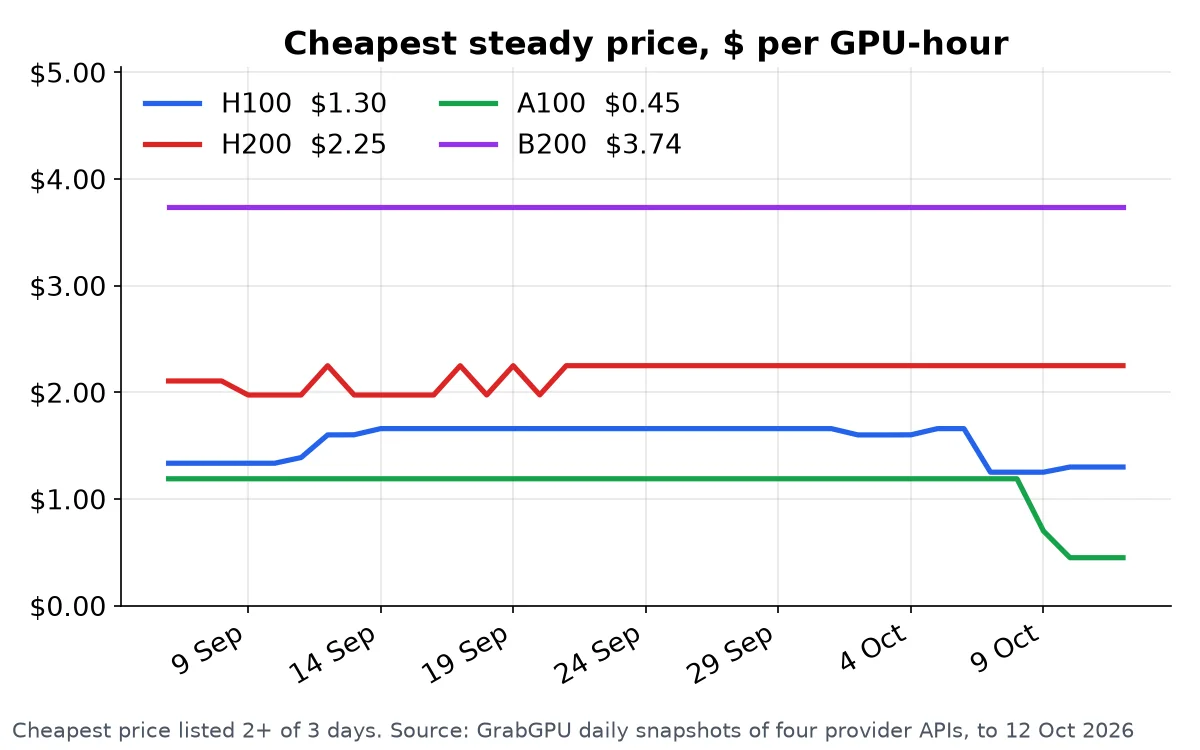
GrabGPU never puts spot prices in a headline. A preemptible bid isn’t the same product as an on-demand hour, and quoting it makes every card look cheaper than anyone can rent it.
The API: no key, no trial clock
This is where the two differ most for builders. On the ComputePrices homepage, getting an API key starts “a 14-day trial at Pro limits.”
GrabGPU’s API is “No key, no rate limit, no signup.” You get:
/api/search, which filters by GPU, minimum GPU count, maximum price and stock.in_stockis on by default, and rentable offers come back first, cheapest first./api/best-deals.json, which returns the cheapest GPUs that providers report in stock.- One JSON file per model, with every provider offer and its stock status.
- An OpenAPI description, plus a remote MCP server at
grabgpu.com/mcpwith afind_gputool, so your AI agent can ask “which H100 can I rent right now?” and get a direct answer.
If you’re scripting a GPU hunt or wiring one into an agent, there’s nothing to sign up for and no trial that runs out.
GrabGPU vs ComputePrices at a glance
- Main focus: GrabGPU puts availability first, with price second. ComputePrices covers GPU prices plus LLM token prices (source).
- Coverage: ComputePrices tracks 111 providers. GrabGPU tracks 56 GPU models across 22 providers and only counts capacity it can check.
- Stock: ComputePrices tags some rows “out of stock” (H100 page). GrabGPU has a dedicated page that lists only confirmed-in-stock GPUs, cheapest first.
- Refresh: Both refresh daily (ComputePrices, GrabGPU).
- API access: ComputePrices uses a key that starts a 14-day Pro trial. GrabGPU’s API is free, keyless and has no rate limit, with an MCP server built in.
Which one should you pick?
If you’re comparing inference token prices, or you need the longest possible list of clouds, ComputePrices covers more ground.
If you’re an ML engineer who already knows roughly what a card costs and just needs one you can launch today, GrabGPU is built for you. It shows the in-stock cards and lets the rest drop off.
One honest note that applies to both: stock is what each provider reported at the last check, not a booking guarantee. Confirm on the provider’s site before you pay.
Grab the card before someone else does
Cheap capacity doesn’t wait for you to finish comparing tabs. Open the list of GPUs you can actually rent, cheapest first, and get your job running.
See what’s in stock right now on GrabGPU →
Some provider links on GrabGPU are referral links. You pay the provider the same price either way.